Catering & Services in one software
With OfficeEfficient, you can request catering directly when booking a room, compare quotes, and coordinate service providers. The entire process is handled digitally via our software's catering module.
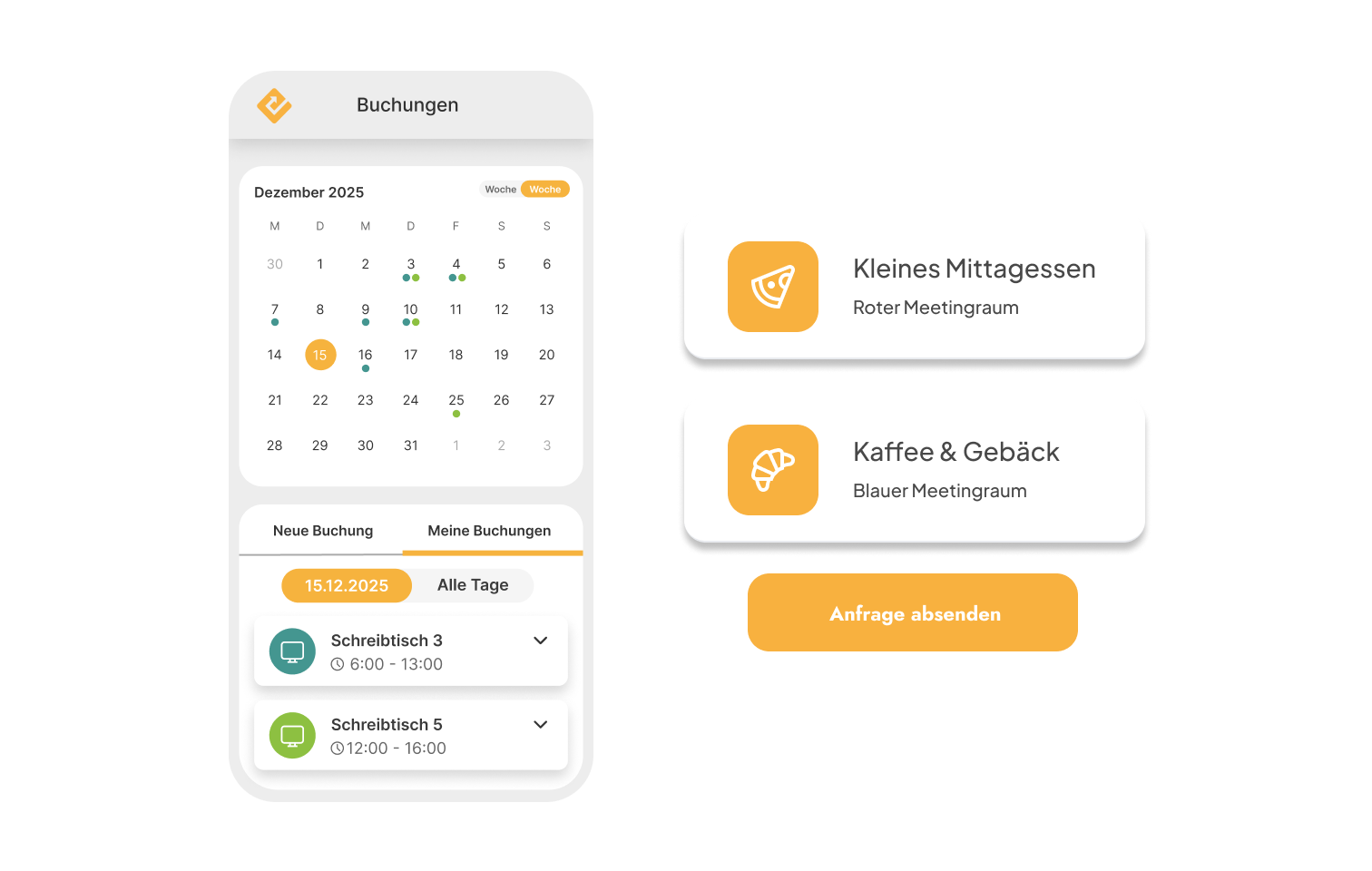

Request catering directly when booking a room
Catering is planned right where the meeting is created: directly within the room booking. When setting up an appointment, employees specify what they need. The number of people, budget, requested time, and special instructions flow directly into the catering request within the software. Depending on the setup, specific service providers can be selected for breakfast, lunch, snacks, or dinner. The request is automatically sent to the responsible person in the company. No separate tool, no extra email, no media discontinuity.
Request, compare & approve quotes
Admins receive the catering request and can communicate directly with the service provider via the software. The service provider creates a quote, adds a menu description, and can upload documents if needed. The admin reviews the quote and either approves or rejects it. If a quote is rejected, the request can be restarted with a single click, for example with adjusted requirements or a different provider. The entire process remains documented and transparent.


Direct coordination with your service providers
No more email chains, phone notes, or lost agreements. Every catering request includes a dedicated message thread within the software between the admin and the service provider. Messages can include file attachments, such as menus, allergen lists, or special requests. A read status lets you know if the provider has seen your message. This way, you always know the status of your coordination and have everything in one place if questions arise.
Full overview of requests, service providers & cancellations
Every request moves through clear stages: open, requested, quote received, confirmed, or declined. You can view the history, communication, and notes for each transaction. Manage your service providers centrally, including their terms, categories, and contact details. If a meeting is canceled, OfficeEfficient alerts you to any linked catering. Cancellations can optionally be set to require admin approval before taking effect.

Features of our catering module
OfficeEfficient digitizes the entire catering process: from the initial request and coordination with service providers to final approval.
Catering in the Booking Flow
Request catering directly when booking a room, including budget, number of people, and preferred time.
Quote Management
Receive, review, approve, or decline quotes. Includes menu descriptions and file uploads.
Service Provider Communication
Communication takes place entirely via OfficeEfficient, with file attachments and read receipts directly within the request.
Status Tracking
Five clear status phases per request: open, requested, quote received, confirmed, and declined.
Service Provider Management
Manage minimum order values, lead times, categories, and contact details centrally within the catering process.
Notifications
Automatic notifications for requests, offers, rejections, and cancellations.
Efficiency that makes an immediate impact
With OfficeEfficient, you can handle bookings, administration, and adjustments in seconds. Clear structures, fast processes, and intuitive features ensure a modern and efficient office experience.
Companies using OfficeEfficient double their actual office space utilization on average.
300+ companies in the DACH region
From mid-sized businesses to large corporations: Over 300 companies already manage their offices with OfficeEfficient – processing more than 1 million bookings per month combined.
Security & data protection to the highest standards
ISO 27001 certified, GDPR compliant, and hosted exclusively on servers in Germany. Your data remains protected and within the country.
Informed decisions instead of gut feelings
All booking data clearly displayed in one dashboard: occupancy, trends, and usage at a glance – for decisions based on real data, not guesswork.
No additional tool required
OfficeEfficient integrates seamlessly into your existing system landscape and connects directly to your Microsoft setup – no separate tool needed.
Highly intuitive, no training required
Clear user guidance ensures that employees can use OfficeEfficient from day one – with no training required.
What companies working with us have to say
As an intelligent booking system for workstations and conference rooms, OfficeEfficient is a central component of our Eco System for Smart Services. Based on booking data and our run sheet, cleaning is managed flexibly and on-demand, which increases cleaning quality, conserves resources, and drives efficiency. Furthermore, it allows for optimal planning of conference services and catering. We also successfully use OfficeEfficient in our own office spaces for modern desk sharing and the continuous optimization of our space utilization.
Team Lead, Center of Digital Excellence, Klüh Service Management GmbH
– verified from

OfficeEfficient is an integral part of our daily work routine. It helps us identify vacancies immediately and utilize floor space efficiently, which has a direct positive impact on our cost structure. At the same time, the tool creates clarity, fairness, and flexibility, ensuring that our employees feel good about coming into the office.

Project Manager GALERIA
– verified from
What I like best is the seamless onboarding and the incredibly helpful team at OfficeEfficient. The support during the integration into our company of 500 employees was top-notch and made the entire process so much easier. As the project lead, I am thrilled with the professional guidance and the efficient workflow. A big thank you to the team for the great collaboration – I’m already looking forward to onboarding our other locations!
@Thomas
– verified from
Q&A about OfficeEfficient
The most common questions about desk sharing, room management, visitor management, and other features.
What is OfficeEfficient?
OfficeEfficient is a digital workplace management software and booking solution for desks, meeting rooms, and other resources in the modern office. Employees can book desks, meeting rooms, or parking spaces in just a few clicks—via app, web browser, or directly in Microsoft Teams. Companies can centrally manage space utilization, booking rules, and locations, gaining full transparency into the actual occupancy of their office spaces. The ideal solution for hybrid work.
Which companies benefit from this software?
Our desk sharing software is ideal for medium-sized and large companies looking to implement flexible working models. Officeefficient is an optimal solution, especially for companies with 100+ employees aiming to make efficient use of their office space. Industries such as the financial sector particularly benefit from its secure integration into existing IT structures.
What are the advantages of OfficeEfficient compared to other tools?
OfficeEfficient offers more than just standard desk-sharing tools: in addition to workspace booking, it integrates room, visitor, cleaning, canteen, and space management into a single platform—complete with real-time data, Microsoft 365 integration, and full GDPR compliance.
Is OfficeEfficient secure and compliant with data protection regulations?
Yes. OfficeEfficient is hosted on German servers by a German provider, ensuring full data sovereignty at all times. The solution is GDPR-compliant and supports role-based permissions, multi-tenant structures, and secure processing of personal data. Depending on the project, SSO, Microsoft Entra ID, SCIM, and custom permission concepts can be implemented.
How complex is the implementation process for our company?
Implementing OfficeEfficient is straightforward and quick. Thanks to preconfigured modules, an intuitive setup, and personalized support, the solution can be tailored to your structures, locations, and processes in just a few days and put to use immediately.
How does OfficeEfficient improve employee satisfaction?
Employees can plan their workday more easily: they can see at a glance which desks, meeting rooms, or parking spaces are available and conveniently book the resources they need in advance. This is especially beneficial in a hybrid work model, as it creates more predictability, reduces time spent searching, and improves team coordination—employees know in advance where they will be working and which colleagues will be on-site.
Didn't find your question? Contact us
More efficiency for your office. Instantly measurable.
Increase utilization, reduce costs, and create flexible work environments that employees actually use.
Features & Functions
Digital management of spaces, rooms, and services – centralized and automated.